
Great games.
A season worth remembering.
To organize hockey team awards, keep one roster, record each recipient after the game, and review your season regularly. A short note about why the player earned the award makes the record more useful than a name alone.
Use the free Player of the Game tracker or a downloadable award workbook during the season. When the final event approaches, use those notes to plan player recognition and a separate thank you for coaches and volunteers.
Open the free hockey trackerNo account required. Records stay in your browser on your device. Download backups regularly.
Set up your roster once.
Start with the team name, season, and current players. Nicknames or jersey numbers are enough. If two players share a name, include their numbers so you can tell them apart.
Choose one person to maintain the award record. The coach can select the recipient while the team manager records the details. Keeping one main copy avoids competing versions of the season.
If you use the free hockey Player of the Game tracker, bookmark it on the device you plan to bring to the rink.
Record the player and the moment.
Save the award while the game is still fresh. Record the date, opponent, player, award name, and one sentence explaining the recognition.
Specific notes help you remember the moment when you look back at the end of the season.
Player of the Game
“Made the pass that started the winning play.”
Heart & Hustle
“Kept backchecking right to the final whistle.”
Goaltending recognition
“Stayed calm during a busy third period.”
Teammate recognition
“Encouraged the bench after a tough shift.”
These are example notes, not rules for selecting recipients. Choose recognition that fits your team and the contributions you want to acknowledge.
Playing the same opponent twice in one day? Add a label such as “Tournament game 2” so the records are easy to distinguish.
See who has been recognized.
Before the next game, review your award history. The free tracker’s season overview shows award totals and active players who have not received an award yet.
Use that information as a reminder to notice different contributions: smart decisions, defensive effort, persistence, saves, passing, and support for teammates.
If a player leaves the team, archive their roster entry in the free tracker. Their past awards remain in the history.
Back up your season after each game.
The free tracker saves records in the browser you are using. It does not create an account or automatically sync your phone, tablet, and computer.
- After recording the game, download a JSON backup.
- Keep the backup somewhere private and easy to find.
- Before changing devices or resetting the season, make sure you have the latest copy.
To hand the record to another manager, privately share the latest JSON backup. They can import it into the tracker on their device. Importing replaces the records already saved there. It does not merge two versions.
A CSV export is useful for reading your award log in a spreadsheet. It cannot restore the tracker. Keep a JSON backup for that purpose.
A spreadsheet and printable sheets for your season.
If you prefer working in Excel or taking paper notes at the rink, the Ultimate Hockey Award Toolkit offers a separate way to organize your awards.
Your season’s awards, organized.
- Excel workbook with automatic award totals.
- Space for 40 players and 500 awards.
- Four printable PDF sheets for handwritten records.
- Quick start instructions to help you get set up.
Open the workbook in Excel or import it into Google Sheets. Print the PDF sheets when you want a paper copy at the rink.
The workbook and free browser tracker do not sync. Choose which record you will keep current.
View the Ultimate Hockey Award ToolkitDigital files only. No physical stickers, hockey pucks, or marker are included.
Keep your award supplies together.
Choose who brings the stickers, pucks, and marker to the rink. Count planned recipients rather than games, especially if you give more than one award or have a tournament coming up.
For example, one puck award after each of 24 games requires 24 stickers and 24 pucks. Two 20-sticker packs would cover those awards, with stickers left for additional recognition.
- Player of the Game Puck Stickers: 20 matching stickers for your game award routine.
- Heart & Hustle Hockey Puck Stickers: 20 matching stickers for effort and determination.
- Mixed Hockey Puck Award Stickers: 20 stickers across six designs.
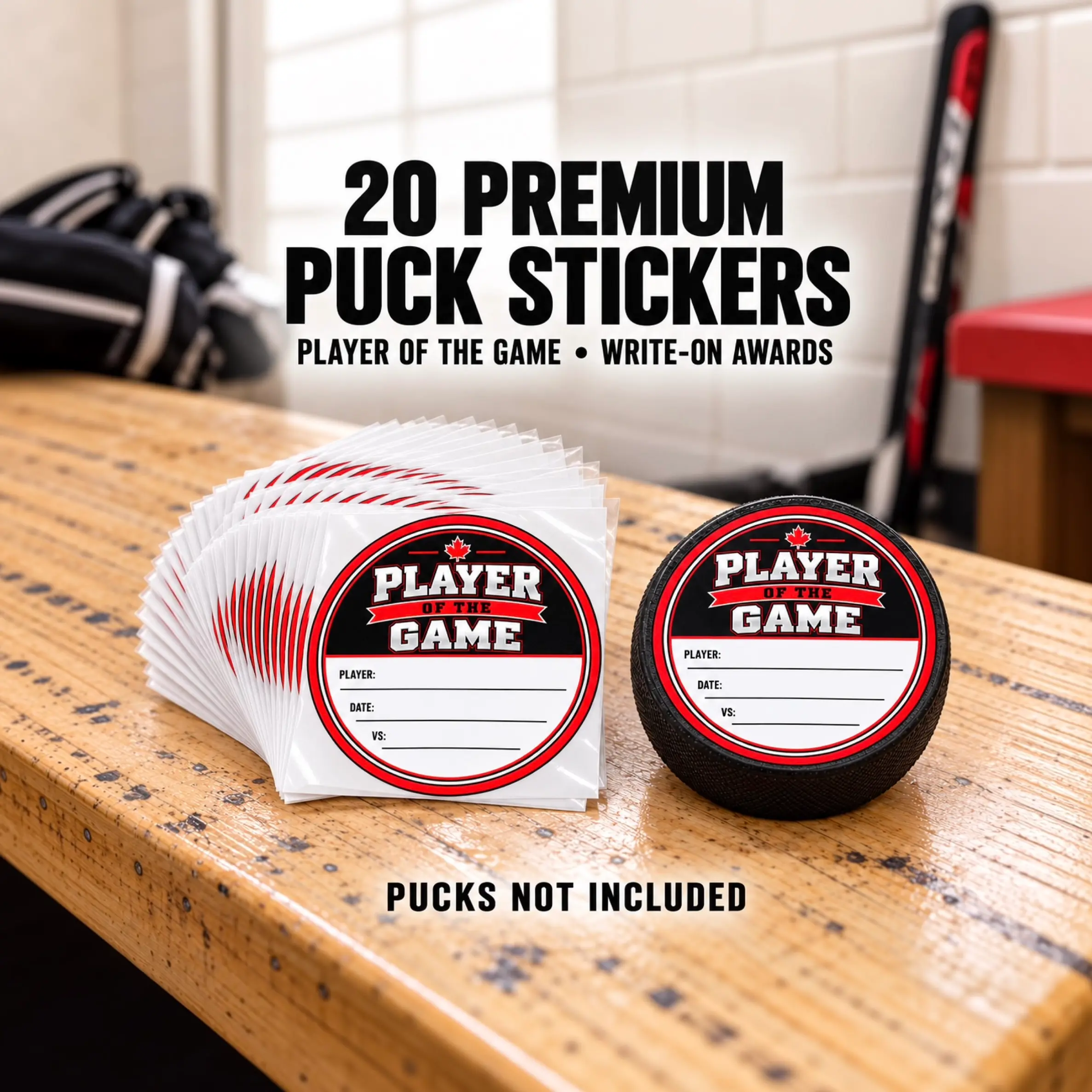
Pucks and marker are not included. Follow the application instructions supplied with the stickers.
Close the season with a clear recognition plan.
Use your award history as a reminder of the season, not an automatic ranking. Pair your notes with the coaches’ observations when choosing final player awards.
- Save the record. Download a final JSON backup and, if useful, a CSV award log before resetting anything.
- Confirm player recognition. Check names, choose the award titles and write one specific reason for each recipient.
- List the adults to thank. Include coaches, assistants, the trainer, manager and other volunteers who supported the team.
- Count complete gifts. Record how many stickers, pucks, cards and markers you need. Include shipping in your budget.
- Assign the preparation. Choose who collects messages, applies the stickers and checks each finished gift.
- Plan the presentation. Pack gifts in order and give each presenter the recipient’s name and a short explanation.
For category ideas, see end of season hockey awards. For presentation order and event planning, use the hockey banquet guide.
Prepare seven coach and volunteer puck gifts.
The Hockey Coach Thank You Puck Sticker Kit gives your team matching award fronts and blank backs for personal messages. You apply the stickers to your own pucks and add the handwriting at home.
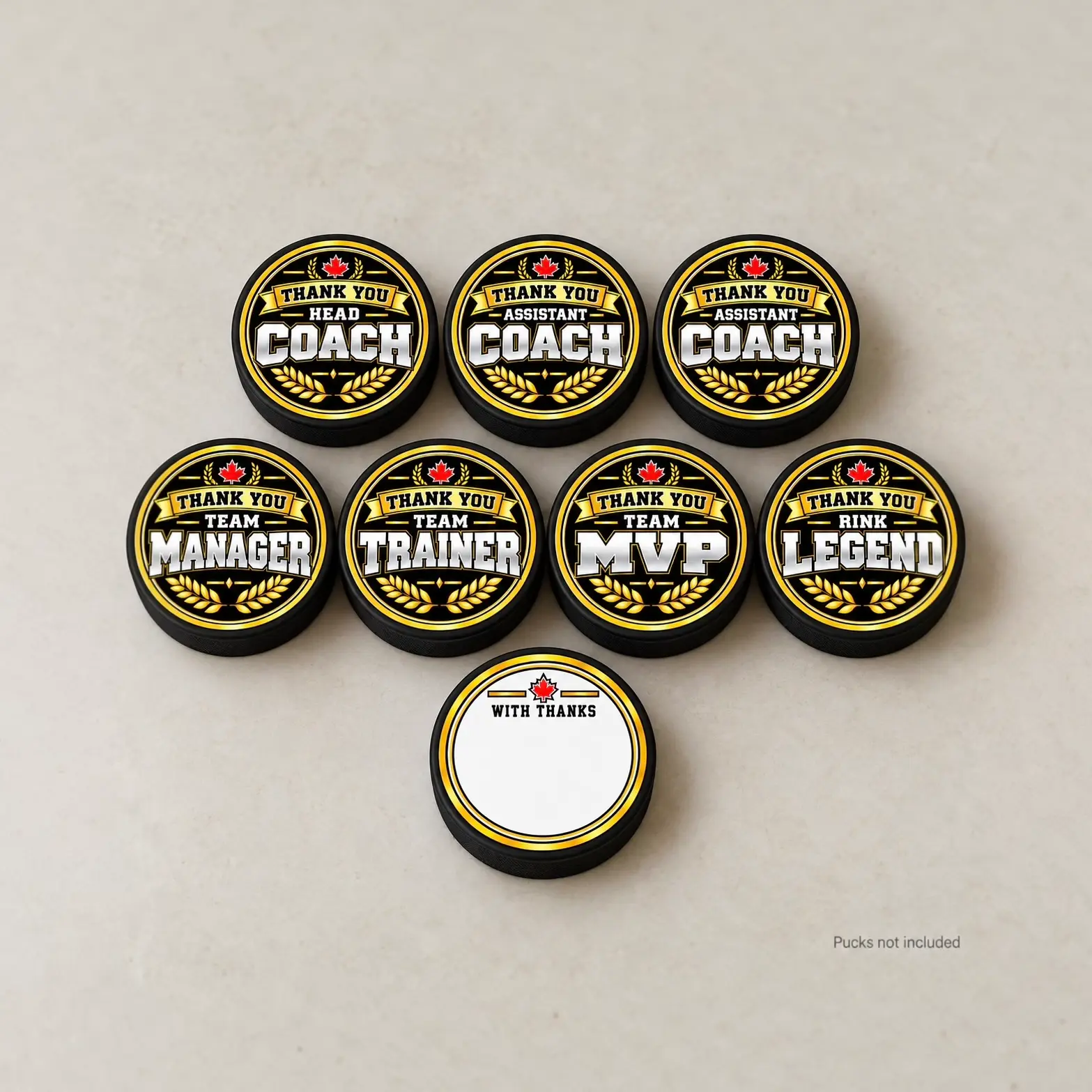
Check the pack against your recipient list.
- 1 Head Coach and 2 Assistant Coach fronts
- 1 Team Manager and 1 Team Trainer front
- 1 Team MVP and 1 Rink Legend front
- 7 matching blank “With Thanks” backs
Team MVP or Rink Legend can thank a fundraiser, organizer or supportive parent. Explain their contribution in your handwritten message. The printed titles and quantities are fixed.
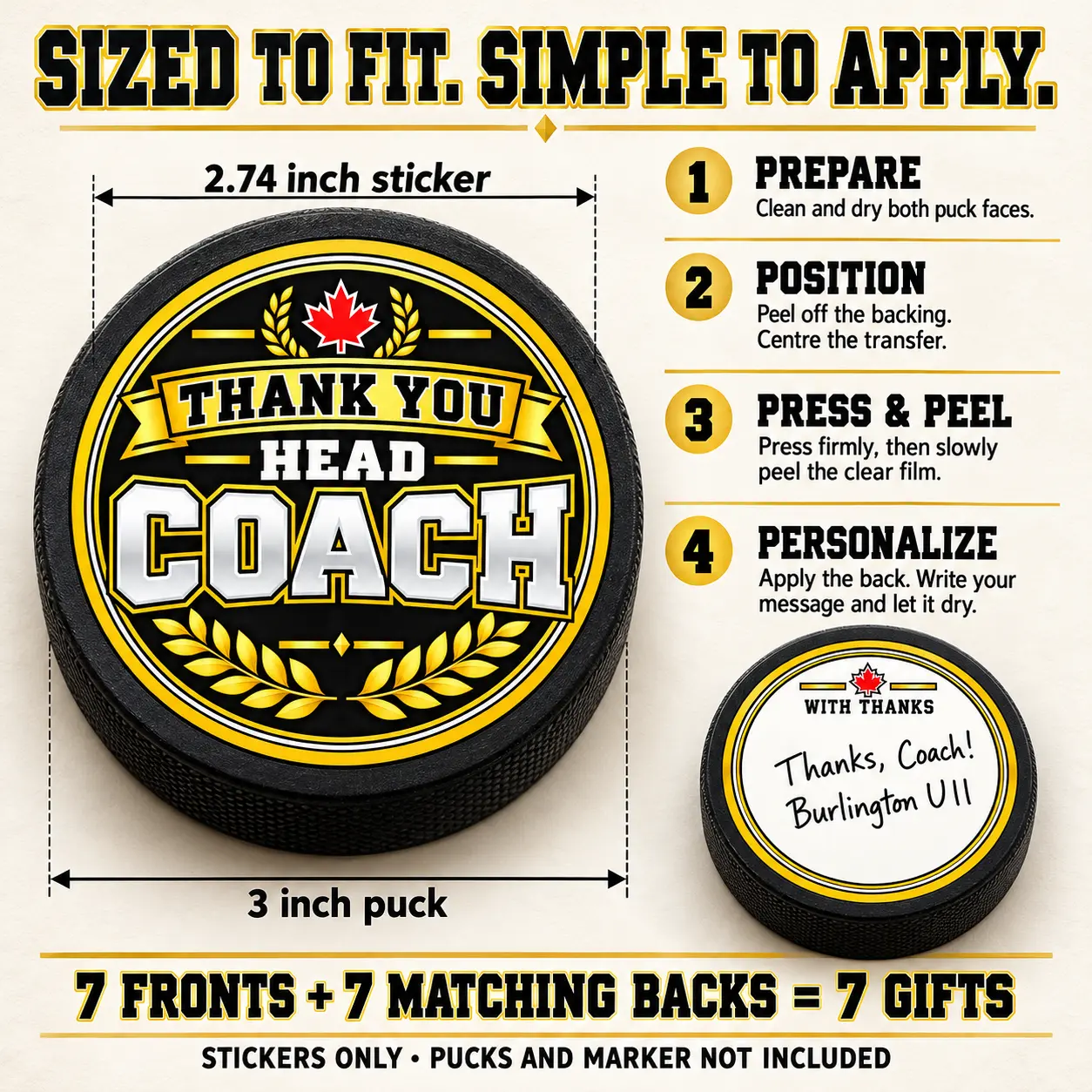
Seven fronts plus seven backs make seven gifts, not fourteen. Supply seven standard 3 inch pucks and a marker. Check the product page for current price and delivery details.
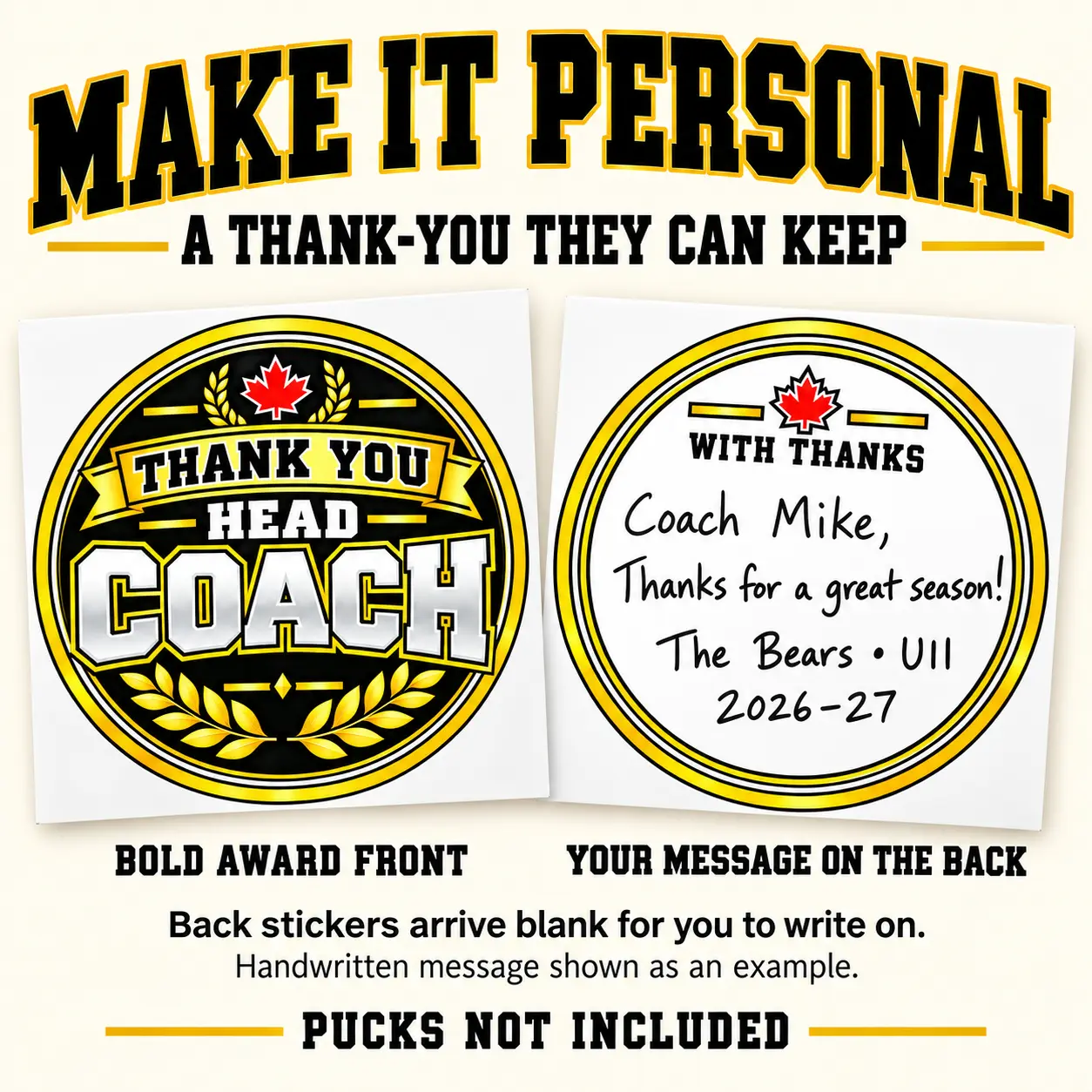
View the coach thank you sticker kitKeep the message short and personal.
“Thanks for believing in us, Coach. Burlington U11, 2026.” A team name, season and a few thoughtful words are enough. Use a separate card for longer notes or a full roster of signatures.
Questions from coaches and team managers
How many pucks do I need for the coach kit?
Seven standard 3 inch pucks for the full kit. Its 14 stickers are seven award fronts and seven matching backs, so each gift uses two stickers.
Does the award workbook include coach stickers?
No. The Ultimate Hockey Award Toolkit is a digital workbook and printable PDF package. The coach thank you kit is a separate physical sticker product. Neither includes hockey pucks.
Can I change the coach kit titles?
The designs and quantities are fixed as pictured. Add the recipient’s name, team, season and personal message by hand on the blank back.
Is the hockey award tracker free?
Yes. You can use the browser tracker and download backups without buying the toolkit. The toolkit is an optional workbook and printable PDF package.
Can two coaches use the same award record?
You can pass a JSON backup between devices, but the free tracker does not sync or merge changes. Keep one main copy and agree who is maintaining it.
Do I need players’ full names?
No. Nicknames or jersey numbers work. Use enough information to distinguish players without adding unnecessary personal details.
Can I use Excel or Google Sheets instead?
Yes. Export the free tracker’s award log as a CSV, or use the Ultimate Hockey Award Toolkit for a workbook with automatic totals and printable sheets. Spreadsheet records remain separate from the browser tracker.
What should I save at the end of the season?
Download a final JSON backup before resetting the tracker. Export a CSV if you also want a spreadsheet copy of the award log. Review your notes while planning your end of season recognition.
Be ready for the next great game.
Set up your roster, record the next award, and keep a backup. A few minutes after each game can give you a season of moments worth remembering.
Start your free hockey award tracker